How to install a graphics card
The graphics card is the part of your PC that powers modern games, making environments look ever more lifelike and immersive. You don't strictly need one

- How to build a PC: An online guide to building your own computer from scratch
- How to take a PC case apart
- How to install a power supply
- How to install a motherboard
- How to Install an Intel processor
- How to install an AMD processor
- How and Where to Properly Install PC Cables and Wires for SSD, Panel Switches, and More
- How to Install a New Hard Drive or SSD Drive on a PC
- How to Install and Use an SSD (Solid-State Drive)
- How to Install an Optical Drive
- How to install a graphics card
- How to install expansion cards
- How to put a PC case back together
The graphics card is the part of your PC that powers modern games, making environments look ever more lifelike and immersive. You don’t strictly need one – most of today’s processors have integrated graphics – but a discrete card is far more powerful.
1. Remove blanking plate

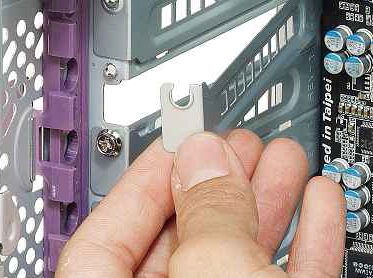
First, locate the PCI Express x16 slot and remove the associated blanking plate. If you’re going to be fitting a double-height card, then you’ll need to remove the blanking plate on the next expansion slot as well.
The procedure will differ depending on your case, so check its manual for full details. Typically, blanking plates are either screwed in place individually, or they’re all held in place by a single retaining bar. Some blanking plates just lift out, while others are attached to the case and need to be rocked backwards and forwards to snap them out.
2. Plug card into slot

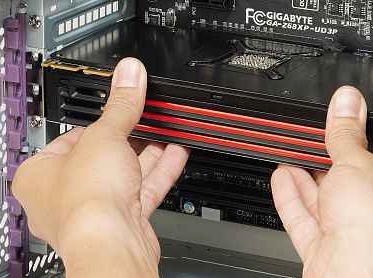
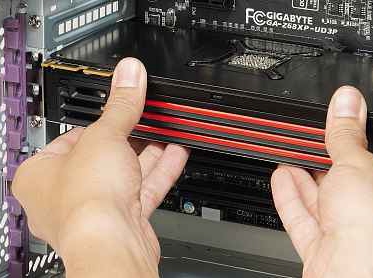
With the blanking plates free, you can put your card into the case. This is easy to do: simply line up the graphics card’s connector with the slot in the case. The card should look like it’s upside down, with the fan pointing towards the bottom of the case.
Pressure on both sides of the card should be enough to make sure that it ends up seated in the expansion card slot properly. You should check the card when you think it’s in place to ensure that you’ve made proper contact. If you can still see some of the card’s slot sticking out, then push the relevant side in a bit further.
3. Screw card in place

How you remove the blanking plate will depend on how you attach your card securely, so check the case’s manual for full details. In most instances, you’ll need to screw the card into place. Line up the top of its connector with the screw hole in the case and screw it into place so that the card can’t move in its slot.
4. Connect power adaptor

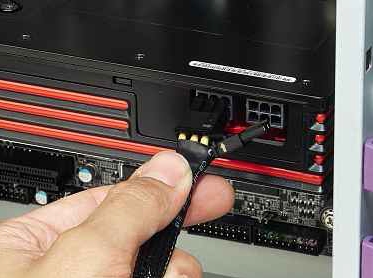
Most modern graphics cards require a secondary power source to run. These will need a dedicated PCI Express six-pin power connector. Most modern power supplies have one of these, but if yours doesn’t, a Molex-to-PCI Express adaptor is often bundled with graphics cards. The PCI Express power connector can plug in only one way and can be pushed easily into place.
Buy graphics cards on Amazon now
Related Posts
No related posts.
Original publication by Alphr: Source article