Apple NotesBy MacRumors Staff on June 17, 2026Jump to How Tos ArticlesApple Notes How TosiOS 26: Import and Export Markdown Files in Apple NotesWednesday September 3, 2025 6:42 am PDT by Tim HardwickIn iOS 26, currently in beta, A
Wednesday September 3, 2025 6:42 am PDT by Tim Hardwick
In iOS 26, currently in beta, Apple Notes has gained new Markdown support, letting you seamlessly import and export files in the popular plain-text formatting language. Whether you're a developer, writer, or content creator, this long-awaited feature should bridge the gap between your existing Markdown workflow and Apple's native note-taking app.
For those unfamiliar with Markdown, it's a...
Tuesday November 5, 2024 7:30 am PST by Tim Hardwick
With iOS 18, Apple introduced several handy improvements to the Notes app, making it easier to organize information and add visual flair to your notes. Read on to learn how these new features can improve your note-taking experience.
The following four new Notes features are worth getting acquainted with in iOS 18.
Collapsible sections allow for better organization of lengthy notes...
Thursday September 19, 2024 4:10 am PDT by Tim Hardwick
In iOS 18, Apple has made a significant enhancement to the Notes app, introducing a built-in audio recording feature that streamlines the process of capturing and transcribing voice notes. The new functionality is available on iPhone 12 and later models, and allows you to record audio directly within a note, eliminating the need to use separate apps or share files.
The new audio recording...
Monday December 4, 2023 5:09 am PST by Tim Hardwick
Apple's stock Notes app has come a long way since it first appeared on Mac, with password protection, tables, and document scanning being just a few of the top features it has gained in recent years. These and other improvements offer compelling reasons to migrate from a rival note-taking platform, especially if you've been paying for the privilege.
Evernote users in particular may feel...
Wednesday November 29, 2023 2:41 am PST by Tim Hardwick
In 2022, Apple added a new feature to the stock Notes app on iPhone and iPad that allows you to quickly scan printed or handwritten text and save it in digital text format. Keep reading to learn how it works.
On earlier versions of iOS and iPadOS, scanning text into Apple's Notes app required tapping on a note's text field and tapping the Live Text option in the popup menu. However, Apple...
Tuesday October 10, 2023 6:30 am PDT by Tim Hardwick
In iOS 17 and MacOS Sonoma, Apple added the ability to open and annotate PDFs right in the Notes app. Keep reading to learn how it's done.
In the latest version of iOS and macOS, Apple has updated the Notes app to support inline PDFs, which means you can insert a PDF into Notes and then read, annotate, and collaborate on the document. This functionality also works for scanned documents, and...
Tuesday October 10, 2023 5:51 am PDT by Tim Hardwick
In iOS 17 and macOS Sonoma, Apple added new formatting options to Apple Notes, including block quotes and a new Monostyle style. Here's how to make use of them.
Thanks to additional formatting options in Apple Notes, you can now add block quotes to your notes. Block Quote formatting makes it easy to visually offset a section of writing with a quote bar to the left of the text.
Simply...
Monday September 11, 2023 7:53 am PDT by Tim Hardwick
In iOS 17, Apple has made its stock Notes app significantly more useful by adding the simple yet powerful ability to link notes and connect related notes together. Here's how it works.
With just a few taps, you can create links between notes in iOS 17, making it easy to jump from one idea to another. One way of adding a new link is by long pressing on a space in any note. Another way is to...
Wednesday May 3, 2023 12:52 pm PDT by Tim Hardwick
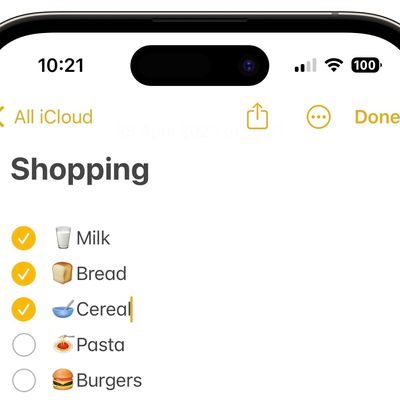
Apple has made its stock Notes app a lot more useful in recent versions of iOS and iPadOS, adding several features that rival notes apps have offered for a while. One of these features is the ability to create checklists. Here's how it works.
When you create a checklist in Notes, each list item has a circular bullet next to it that can be marked as completed, which is convenient for checking ...
Thursday October 7, 2021 4:56 pm PDT by Tim Hardwick
In iOS 15, Apple has added a much-requested feature to the Notes app in the form of tags. This means you can now include hashtags in your notes which can help you organize your notes and find stored notes more easily. Let's take a look at how they work.
Launch the Notes app and create a new note or select an existing one.
Add a tag anywhere in the note by using the hash (#) symbol and...
Thursday August 5, 2021 7:05 am PDT by Tim Hardwick
In iPadOS 15, Apple introduced a new productivity feature called Quick Notes that aims to provide a quicker way to jot down things on your iPad without you having to go in and out of the Notes app.
Whether you're on the Home Screen or within any app, you can bring up a floating Quick Note window at any time using your finger or an Apple Pencil, by swiping diagonally up from the bottom...
Monday March 29, 2021 10:18 am PDT by Tim Hardwick
In iOS, you can set the system appearance to Dark or Light Mode, which changes the look of every native app on your Apple device, including Notes. If you set your iPhone or iPad to Dark Mode, for example, each note in the Notes app appears by default as white text on a black background.
However, Apple Notes also allows you to switch the background color of individual notes or all of your...
Thursday May 14, 2020 10:55 pm PDT by Tim Hardwick
On Macs running macOS Catalina and later, Apple has fleshed out the features of the stock Notes app, enhanced the viewing and search functions, and made it easier than ever to generate, share, find, organize your notes.
In earlier versions of macOS, for example, users were limited to sharing individual notes in Apple's stock app, which could be frustrating for heavy note-takers....
Thursday October 10, 2019 6:58 pm PDT by Tim Hardwick
In iOS 13, Apple fleshed out the feature set of the stock Notes app while enhancing the viewing and search functions in such a way that it's now easier than ever to generate, find, and organize your notes.
In particular, there are new options to share entire folders of notes with friends or colleagues, including the ability to share your notes in a read-only capacity. Keep reading to learn...
Wednesday June 17, 2026 10:11 am PDT by Joe Rossignol
The upcoming iOS 27 update that Apple unveiled last week includes some new features and enhancements for Apple's Notes app on the iPhone.
iOS 27 is currently available as a developer beta, with a public beta to follow in July. The update is expected to be released to all users in September.
Below, we have outlined four additions to Apple's Notes app on iOS 27.
Siri AI
On the iPhone...
Monday June 9, 2025 1:00 pm PDT by Hartley Charlton
Four productivity improvements are coming to Apple Notes and Reminders in iOS 26, iPadOS 26, and macOS 26.
In Reminders, Apple Intelligence can now suggest relevant tasks and items automatically, such as to-dos pulled from emails or notes, or grocery items based on your habits and patterns. These suggestions are contextual, personalized, and designed to reduce the friction of capturing tasks ...
Wednesday June 4, 2025 4:37 am PDT by Tim Hardwick
Apple's Notes app is rumored to be getting limited Markdown support in iOS 26 and macOS 26, according to 9to5Mac. The feature would allow users to export text in the markdown format.
Markdown is a lightweight markup language that some writers prefer to use over rich text. Rather than using HTML for bold, italics, links, and headers, Markdown uses quick character shortcuts like **bold** or...
Saturday November 16, 2024 9:45 am PST by Joe Rossignol
Earlier this month, we reported about some iPhone users temporarily losing all of their notes in the Notes app after accepting Apple's updated iCloud terms and conditions. Apple has now indirectly acknowledged this issue in a new support document that outlines steps to follow if your iCloud notes are not appearing on your iPhone, iPad, or Vision Pro.
Fortunately, the notes can be re-synced...
iOS 18 will include new audio transcription features in the Voice Memos and Notes apps, according to information obtained by AppleInsider.
The report claims that transcriptions of audio recordings will be available in both the Voice Memos and Notes apps on iOS 18. In addition, the Notes app will apparently be able to provide AI-generated summaries of key points in audio recordings. These...
Apple's stock Notes app got hardly any screen time during yesterday's WWDC keynote, but one powerful addition to the app in iOS 17 is a new ability to link notes and connect related notes together.
With just a few taps, you can create links between notes, making it easy to jump from one idea to another. Long press on a space in any note, and a new "Add Link" option can be found in the pop-up ...
Monday March 21, 2022 12:40 pm PDT by Joe Rossignol
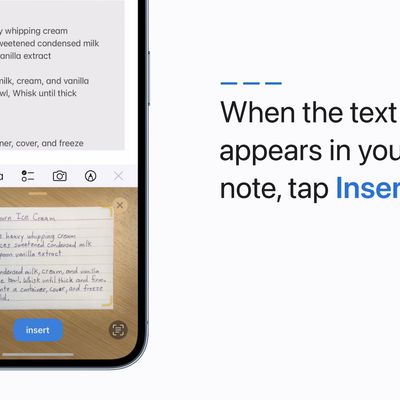
iOS 15.4 and iPadOS 15.4 were released to the public last week, and one new change is the addition of a "Scan Text" shortcut for quickly scanning printed or handwritten text into the Notes app on the iPhone and iPad.
Apple recently shared a video with step-by-step instructions on how to use the Scan Text feature. On a device running iOS 15.4 or iPadOS 15.4, simply open the Notes app, tap the ...
If you've installed the public beta of iOS 15, iPadOS 15, or macOS Monterey on any of your devices, you may have already tried out some of the new features Apple has added to the Notes app, such as the ability to use @ user mentions in shared notes and the long-desired support for tags.
However, some users have discovered that notes containing instances of these two new features don't show...
Thursday June 30, 2016 3:21 am PDT by Tim Hardwick
Google has announced a smart new organizational feature for its note-taking and to-do list app, Google Keep.
The app can now intelligently categorize users' notes by topic, such as food, books, and travel, and entries can be searched by keyword using topic shortcuts which appear in the search bar.
Google Keep, which also offers a web interface, includes other features like list support, ...