
NEWS · Apple How-To

iOS 17: How to Send an Audio Message in Apple's Messages App

iOS 17: How to Send an Audio Message in Apple's Messages AppFriday September 1, 2023 4:20 AM PDT by Tim HardwickIn iOS 17, Apple has added several new Messages features and tweaked the interface design of the Messages app to give

vinkoweb · Oct 28, 2026 · 0 views
iOS 17: How to Send an Audio Message in Apple's Messages App
Table of Contents
  1. 1. Popular Stories
  2. 2. iOS 27.3 May Expand RCS Support to Australia's Telstra in December
  3. 3. DoorDash Unveils AI Food Ordering Through Apple's Messages App
  4. 4. Apple Responds to iPhone Duo Display Cracking Reports
  5. 5. Next Article

iOS 17: How to Send an Audio Message in Apple's Messages App

by Tim Hardwick

In iOS 17, Apple has added several new Messages features and tweaked the interface design of the Messages app to give it a cleaner look. This means that the way you navigate and perform certain actions in the messaging app has changed quite a bit.

iOS 17 Messages Feature
For example, previously in iOS 16, sending a voice message involved tapping the waveform icon in the row of apps below the text input field to bring up a record button. But in ‌iOS 17‌ the row of buttons atop the keyboard has gone, and all you have to tap now is a + button to the left of the text field.

ios 17 messages redesign audio
This + button brings up a vertical list of options, where you'll find an Audio‌ button. Compared to the row of app icons that consolidated all options in ‌iOS 16‌, this makes for a much more simplified design, since it's easier to tell what's what with the larger icons and text descriptions.

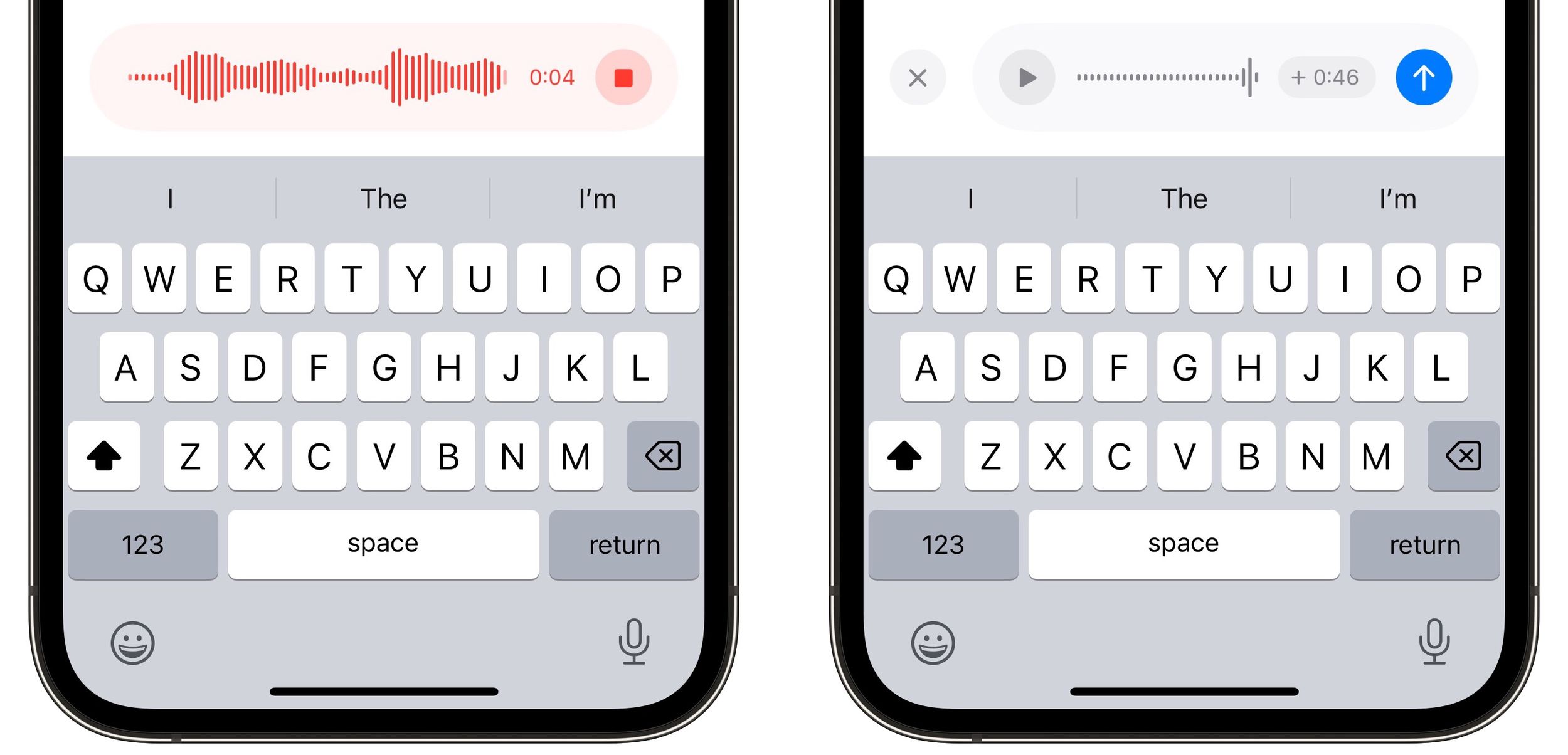
To record an audio message in iOS 17, simply tap the Audio button and your recording will immediately begin. When you're finished recording, tap the red stop button. You can then listen to the recording by pressing the play button, tap the blue arrow to send the audio message, or tap the X on the left to cancel.
messages
In ‌iOS 17‌, Messages may have changed its look and feel, but the interface is actually now more customizable. You can, for instance, organize your iMessage apps and manage iMessage sticker packs right within the app. Click the links to learn how.

ios 26 5 rcs

iOS 27.3 May Expand RCS Support to Australia's Telstra in December

Tuesday October 20, 2026 9:04 am PDT by Joe Rossignol
In a support document that it has since deleted, Australian carrier Telstra said RCS support would be available starting with an iOS update coming in December. If this timeframe remains accurate, then iPhone users with Telstra will likely be able to use RCS in the Messages app starting with iOS 27.3. RCS has many benefits over the traditional SMS standard for text messaging with Android users, ...
doordash

DoorDash Unveils AI Food Ordering Through Apple's Messages App

Wednesday September 30, 2026 7:24 am PDT by Hartley Charlton
DoorDash is inviting U.S. customers to join a waitlist for an AI assistant that can take food orders through Apple's Messages app (via Bloomberg). The phone number used in the conversation connects the request to a customer's DoorDash account. The assistant can use previous purchases and preferences to help put together an order, then use a saved payment method at checkout. Customers can...
iphone duo screen crack

Apple Responds to iPhone Duo Display Cracking Reports

Monday October 26, 2026 10:20 am PDT by Juli Clover
Shortly after the iPhone Duo launched, a few users reported hinge issues that were causing cracks in the inner display. Apple has now responded to the reports in a statement to MacRumors, saying a small number of units are affected. The response to iPhone Duo from early users has been incredibly positive, and we are seeing exciting things from developers who are rapidly updating their apps...
'); }
← More tech stories