
How to Protect Your Netflix Profile With a PIN Code
How to Protect Your Netflix Profile With a PIN CodeFriday April 10, 2020 11:50 AM PDT by Tim HardwickAs part of its updated parental controls, Netflix now includes an option that lets account holders PIN protect individual profile
Table of Contents
How to Protect Your Netflix Profile With a PIN Code
As part of its updated parental controls, Netflix now includes an option that lets account holders PIN protect individual profiles to help prevent kids from using them.

Even if you're not a parent or guardian, so long as you're the account holder you can still use the PIN feature to prevent other people in the same household from watching stuff on your Netflix profile and messing up your recommendations.
The easiest way to set up a PIN for your profile is on the Netflix website. The steps below show you how it's done.
- Launch a browser and go to www.netflix.com.
- Sign into Netflix using your account credentials, then select your profile.

- On the main Netflix screen, select your profile avatar and choose the Account option in the menu.

- Under the Profile & Parental Controls section, use the chevron against your profile to reveal further options.

- Click Change next to the Profile Lock option.

- Enter your account password if prompted.
- Click the checkbox next to Require a PIN to access [yourname] profile, then enter the four-digit pin that you want to use.
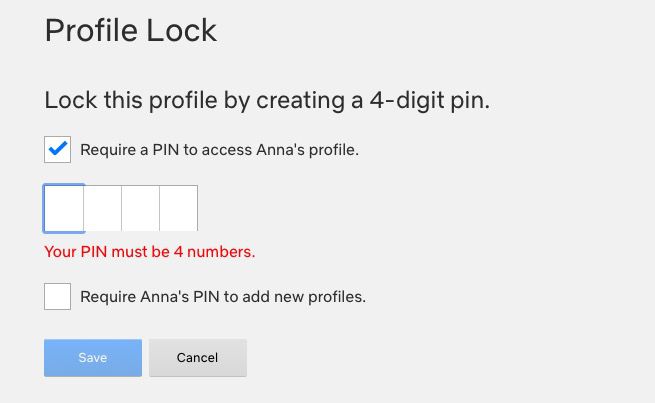
- Click the second checkbox to require the same pin to add new profiles.
- Click Save.
When your PIN is set, Netflix will ask for it whenever your profile is selected at the welcome screen. This will happen on all devices, including smart TVs. Note that you won't be asked for a PIN if your profile is the only one that exists on the account.
In addition to PIN protection for profiles, Netflix has added filters for children's accounts that are based on country ratings, as well as options to remove individual series or films by title, and a feature for reviewing each profile's setting using the Profile and Parental Controls hub in the settings menu.
Popular Stories

Crackgate? iPhone Duo Owners Report Screens Breaking Along the Hinge

Apple Music Has a Hidden iPod You Can Play With

