Check Your Mac's Battery Cycle Count
Check Your Mac's Battery Cycle CountWednesday November 6, 2024 1:53 AM PST by Tim HardwickA key indicator of your MacBook's battery health is its cycle count. Keep reading to learn what it means and how you can check it for yourse

Table of Contents
Check Your Mac's Battery Cycle Count
A key indicator of your MacBook's battery health is its cycle count. Keep reading to learn what it means and how you can check it for yourself.

Modern MacBooks can last 18 hours or more on a single battery charge, but like all rechargeable batteries, the one in your Mac has a finite lifespan. Over time, its capacity to hold a charge gradually diminishes, potentially leaving you tethered to a power outlet more often than you'd like. This is where understanding your Mac's battery cycle count can be important.
Checking your Mac's battery cycle count provides valuable insight into its overall health and remaining lifespan. A cycle count represents the number of times your battery has gone through a full charge cycle, which occurs when you use 100% of its capacity – whether in one sitting or spread across multiple partial charges. By monitoring this number, you can gauge how much life your battery has left and plan accordingly, whether that means adjusting your usage habits or preparing for a potential battery replacement down the line.
Checking Mac Battery Cycle Count
Here's how to check it your Mac's battery cycle count:
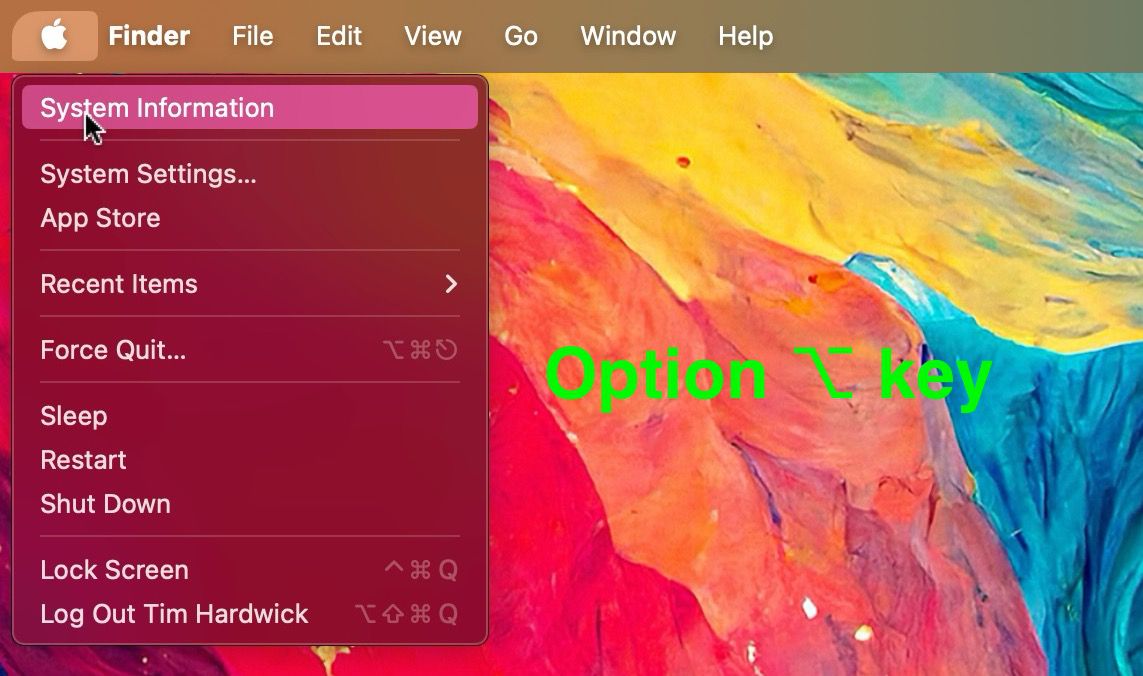
- Click the Apple symbol () in the menu bar while holding the Option key.
- Select System Information from the dropdown menu.
- In the new window, click the Hardware list in the left sidebar if its contents aren't showing.
- Click Power in the expanded Hardware list.
- Look for Cycle Count under "Health Information" in the Battery Information section of the main window.

This number represents how many times your battery has been fully discharged and recharged.
Apple designs MacBook batteries to maintain up to 80% of their original capacity at their maximum cycle count, which varies by model. Recent MacBooks typically have a maximum cycle count of 1,000, while older models range from 300 to 500. You can find your specific model's maximum on Apple's support website.
Remember, reaching the maximum cycle count doesn't mean your battery stops working. It simply indicates when you might notice a decrease in battery life. In macOS Catalina 10.15.5 and later, Apple includes an Optimized Battery Charging feature, which can help extend your battery's lifespan.
Every new Mac bought from Apple comes with a one-year warranty that includes service coverage for a defective battery. If your Mac is out of warranty and the battery hasn't aged well, Apple offers battery service for a charge.
Popular Stories

Crackgate? iPhone Duo Owners Report Screens Breaking Along the Hinge

Apple Music Has a Hidden iPod You Can Play With